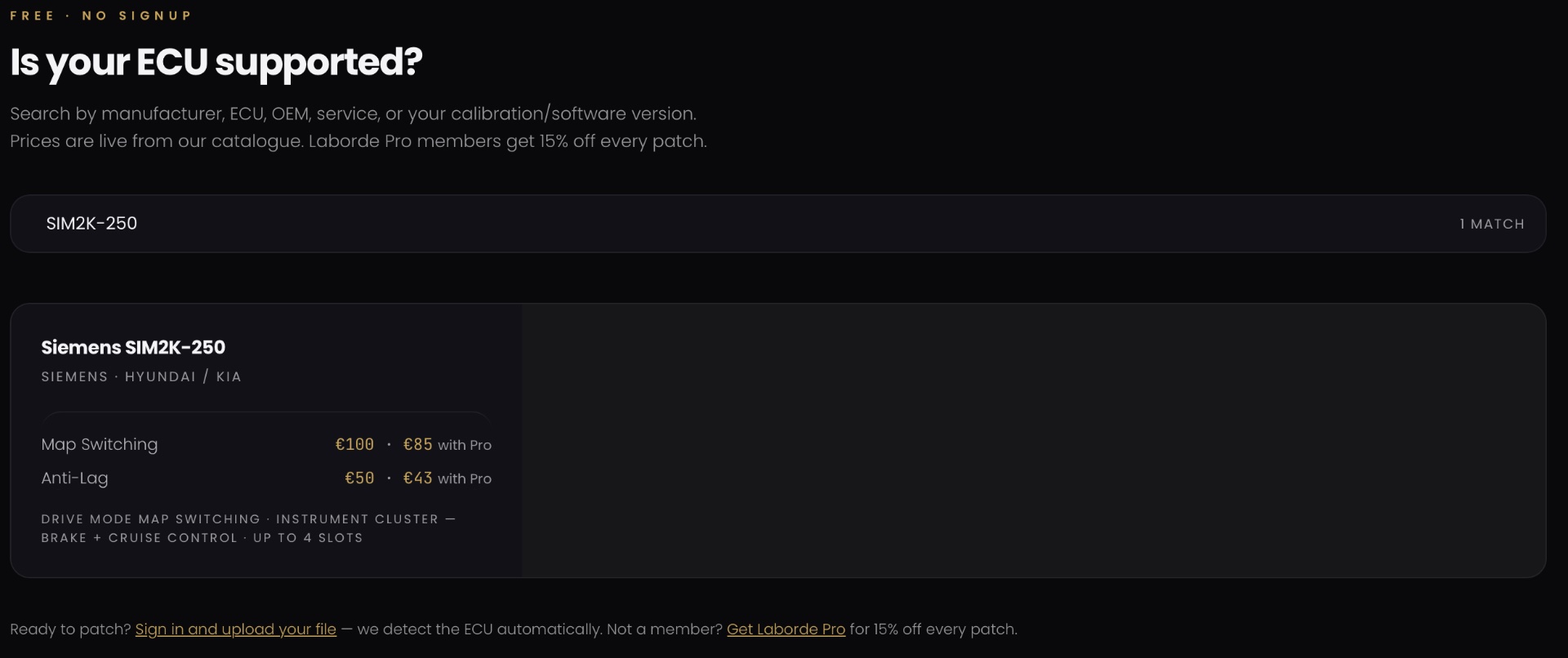
The most frustrating way to find out an ECU isn’t supported is after you’ve paid for a service. So before anything else, check.
Laborde’s ECU compatibility checker is free, needs no signup, and takes about a minute. This post shows you what it tells you, how to read the result, and what to do if your ECU isn’t listed.
Why “supported” is more specific than it sounds
A patch is written for an exact ECU and an exact software version, not for a car model. Two cars with the same engine can run different calibrations, and a patch built for one won’t be correct for the other.
That’s why the checker looks at three things together:
- The ECU family, for example Siemens SIM2K-250 or Bosch MG1CS008.
- The OEM or group it’s fitted to, such as Hyundai/Kia or VW/Audi Group.
- The services available for that ECU, such as map switching, VIN locking or anti-lag.
The catalogue covers 100+ ECU types and 500+ software versions across Siemens, Bosch, Denso and others, but coverage differs from one ECU to the next. An ECU can be supported for one service and not another, which is exactly what the checker shows you.
How to check your ECU
- Open the checker. No account is needed.
- Search. You can search by manufacturer, ECU name, OEM, service, or your calibration/software version.
- Read the result. Each match lists the manufacturer, ECU type, OEM or group, and the services available for it.
- Check the price. Prices are live from the catalogue, so you see the cost of each service before you commit to anything.
Reading a result: a worked example
Say you search for Siemens SIM2K-250. The listing shows it as a Hyundai/Kia ECU, with these services available:
- Map switching
- Anti-lag
- Tuning options
If you instead search for an ECU that appears with a manufacturer and OEM but no services listed, that usually means it’s recognised but no service is currently offered for it.
What if your ECU isn’t listed?
First, double-check the exact ECU name and software version. A small difference in the name, such as MED17.1.1 versus MED17.1.1MS, matters.
If it still isn’t there, the ECU isn’t in the catalogue yet. However, you can request support for any unsupported ECU's through our support WhatsApp or the contact us page. Either way, you’ve found out before spending anything.
Check first, then decide.
Checking takes a minute and costs nothing. If your ECU is covered, you’ll know exactly which services are available for it and what they cost. If it isn’t, you’ve saved yourself a wasted order.